Learn how to use callback URLs to receive notifications about transaction statuses
Understanding Callback URLs
When you make a request to the DigiTax API, we immediately return a response. The status of that transaction by default is PROCESSING.
Below is a snippet of the response to a POST invoice request. The overall_status property reads "PROCESSING".
{
  "id": "invoice_01KPWG8DW1CQBNYS34ZX7QG51T",
  "created_at": "2026-04-23T06:25:54Z",
  "overall_status": "PROCESSING",
  // other key-value pairs
  "validation": {
    "status": "PROCESSING",
    "validated_at": null,
    "errors": []
  },
  "submission": {
    "status": null,
    "predefined_endpoint": null,
    "sent_at": null,
    "accepted_at": null,
    "rejected_at": null,
    "rejection_reason": null,
    "as4_message_id": null
  },
  "reporting": {
    "status": null,
    "sent_at": null,
    "accepted_at": null,
    "rejected_at": null,
    "rejection_reason": null,
    "as4_message_id": null,
    "withdrawal": null
  },
}
Notice the other key-value pairs with status: validation.status reads "PROCESSING", and submission.status and reporting.status read "null". This is because the invoice:
- is being processed in DigiTax
- has not yet been submitted to the customer party's AP
- has not yet been reported to the tax authority's system.
These values will be populated as soon as the invoice is both submitted and reported.
DigiTax saves the invoice into our queuing system to be validated, submitted and reported. This step changes the status property from PROCESSING to COMPLETED. This is apparent via the DigiTax Dashboard or when you make a GET request.
Below is a snippet of the response of a GET invoice request. The overall_status property reads "COMPLETED".
  "overall_status": "COMPLETED",
  "validation": {
    "status": "PASSED",
    "validated_at": "2026-10-20T07:35:48Z",
    "errors": []
  },
  "submission": {
    "status": "NOT_REQUIRED",
    "predefined_endpoint": "9900000098",
    "sent_at": null,
    "accepted_at": null,
    "rejected_at": null,
    "rejection_reason": null,
    "as4_message_id": null
  },
  "reporting": {
    "status": "ACCEPTED",
    "sent_at": "2026-10-20T07:35:51Z",
    "accepted_at": "2026-10-20T07:35:57Z",
    "rejected_at": null,
    "rejection_reason": null,
    "as4_message_id": "325aca99-da25-4fbd-8e39-6aec8b2ee814@phase4",
    "withdrawal": null
  },
Status change make some time and it is not efficient to have you, as the API caller or consumer, to wait for a response. Callback URLs are useful since they inform you as soon as a particular event like a status change happens.
Configure callbacks in the DigiTax Dashboard
Callback URLs are set per business in the DigiTax Dashboard. Test and Live are configured separately, so set your URLs in each environment you use.
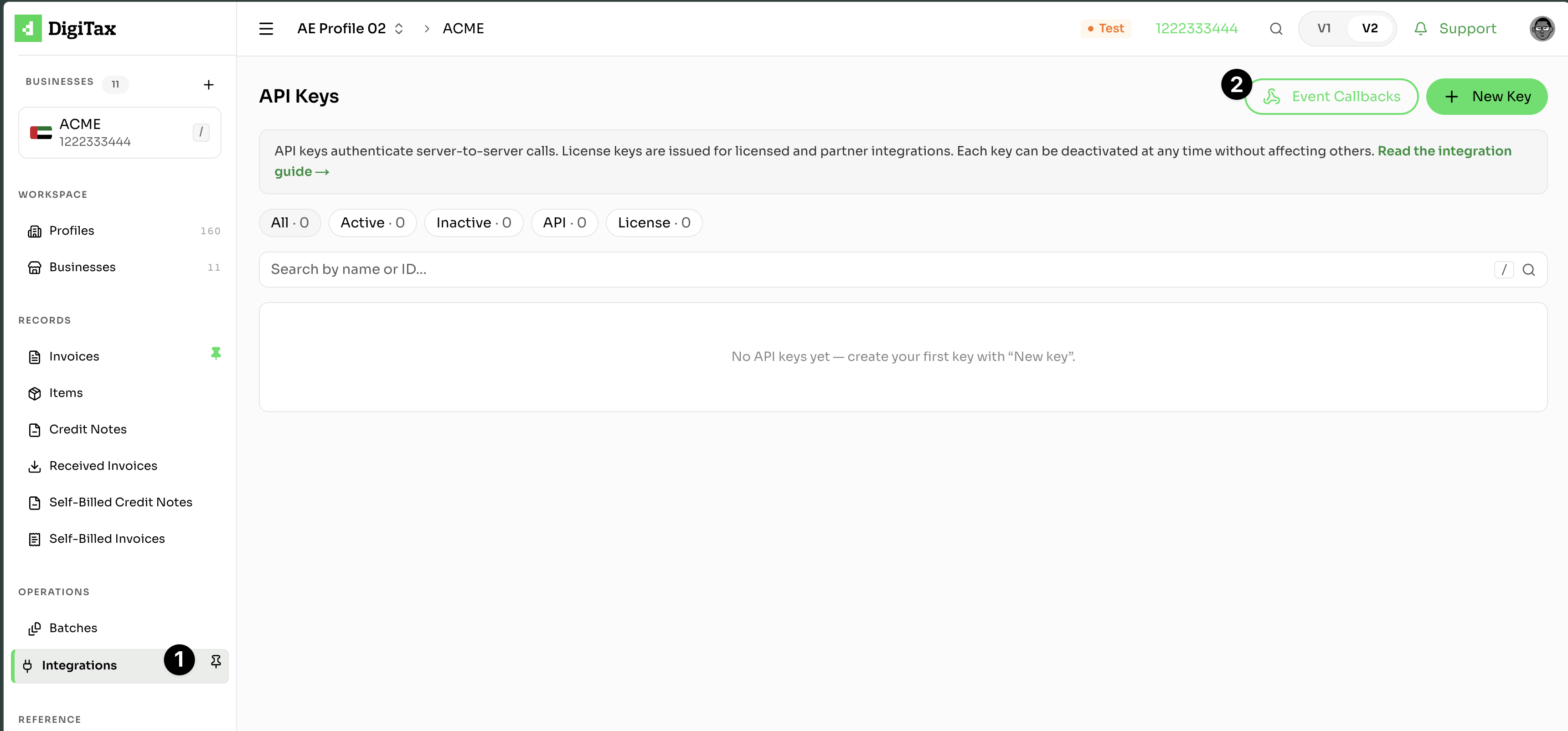
Step 1: Open Event Callbacks
In the sidebar, open Integrations, then click Event Callbacks.
Step 2: Choose an event
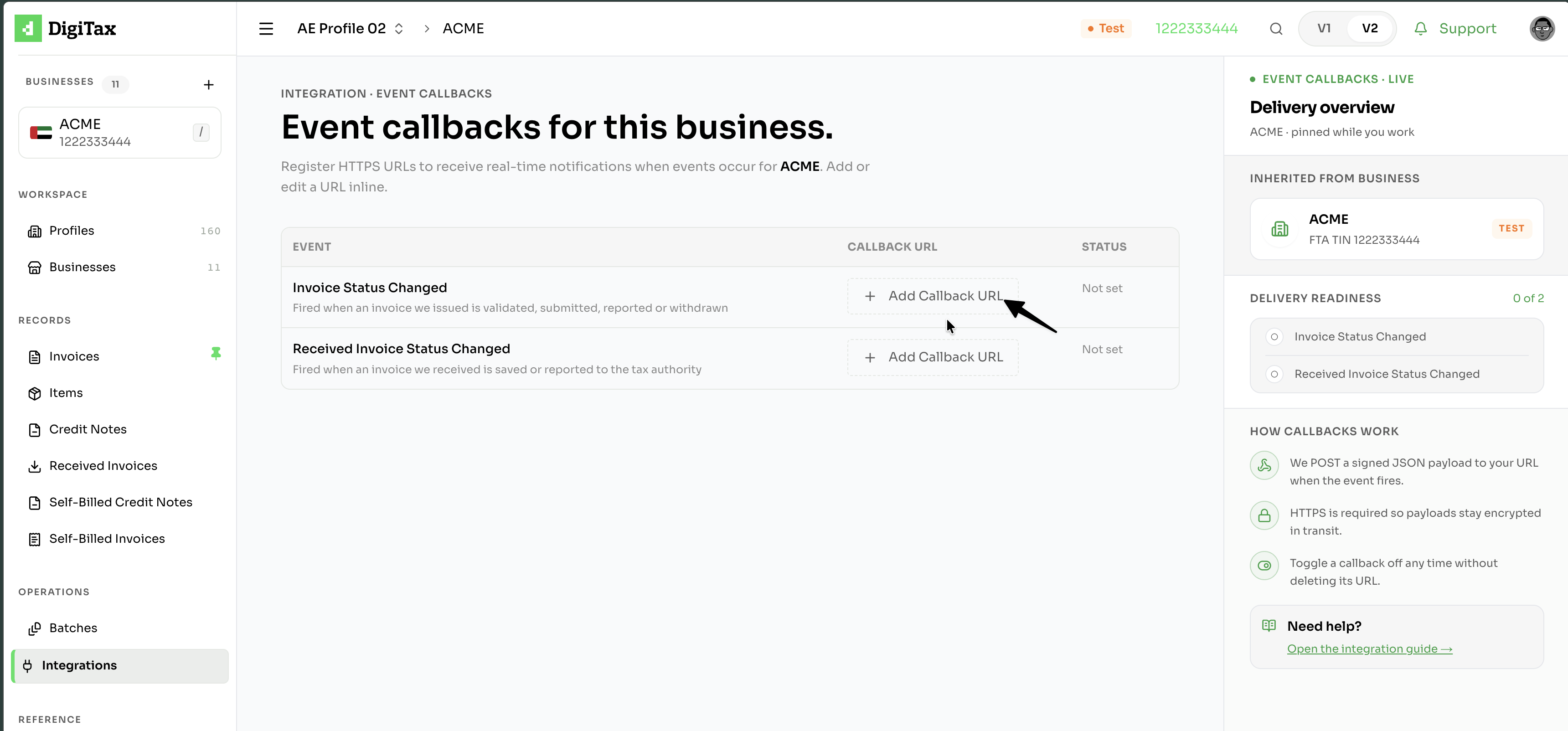
The Event Callbacks page lists the events you can subscribe to. Click + Add Callback URL next to the event you want.
| Event | Fired when |
|---|---|
| Invoice Status Changed | An invoice you issued is validated, submitted, reported or withdrawn |
| Received Invoice Status Changed | An invoice you received is saved or reported to the tax authority |
The document types that fire Invoice Status Changed are invoices, credit noets, self-billed invoices and self-billed credit notes.
Step 3: Enter your URL and save
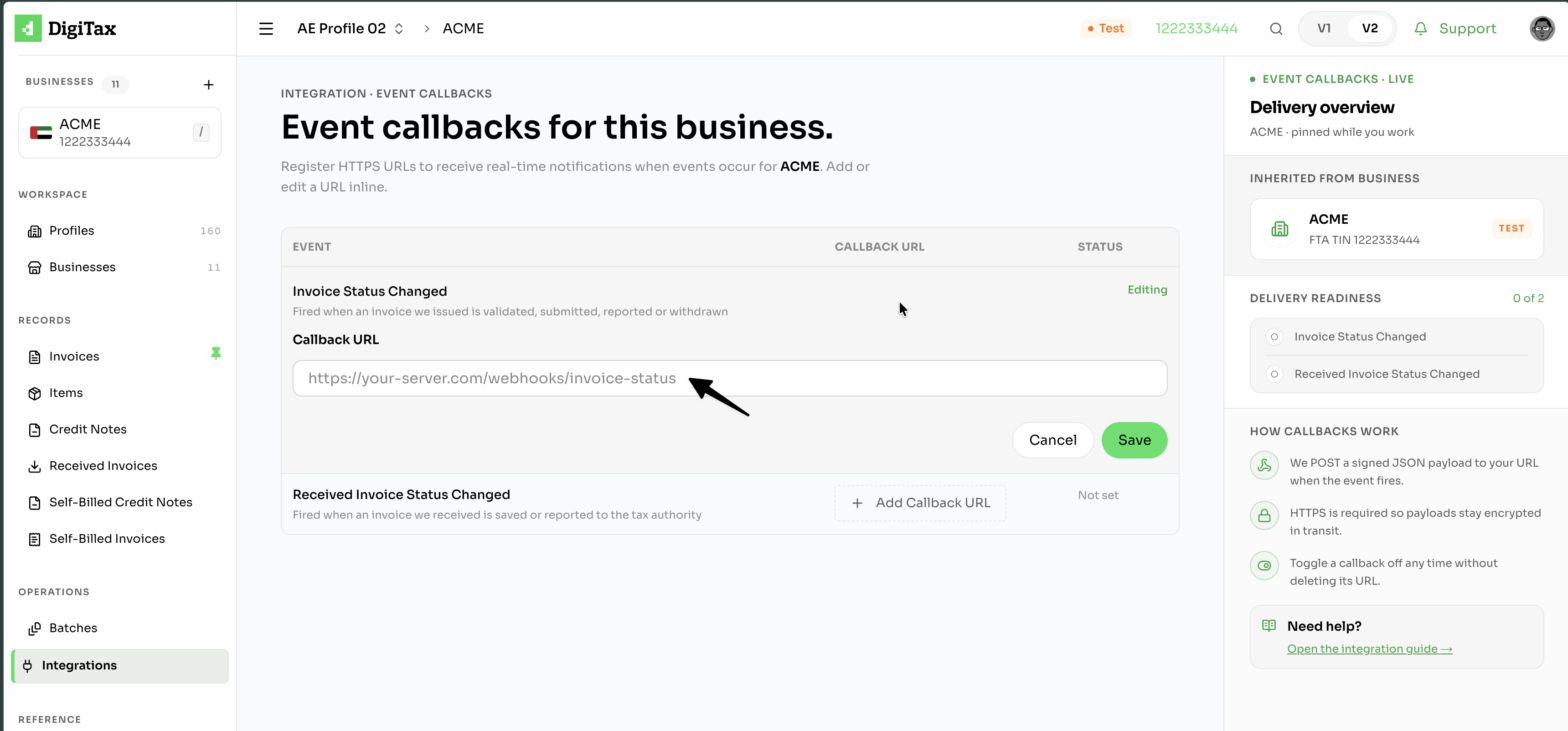
Enter an HTTPS URL, for example https://your-server.com/webhooks/invoice-status, then click Save.
How callbacks work
- DigiTax sends a JSON payload to your URL with a POST request when the event fires.
- HTTPS is required so payloads stay encrypted in transit.
- You can toggle a callback off at any time without deleting its URL.
- The Delivery readiness panel shows how many events have a callback URL configured.