
Create a UAE FTA e-invoice in DigiTax
This guide introduces PINT-AE compliant e-invoices for the United Arab Emirates and covers the steps required to create your first e-invoice.
DigiTax UAE and FTA e-invoicing system
DigiTax UAE integrates your ERP or billing system directly with the FTA e-invoicing system.
DigiTax sits between you, the taxpayer, and the Federal Tax Authority (FTA) e-invoicing platform over the Peppol network.
With DigiTax, you gain access to a streamlined e-invoicing system that ensures strict PINT-AE compliance, handles cryptographic validation, and routes invoices to your buyers and the tax authority.
DigiTax operates as an accredited service provider and certified Peppol Access Point.
An FTA e-invoice
An FTA e-invoice contains several structured components:
- Customer party (the buyer)
- Line items (at least one)
- Payment details (at least one payment entry)
- Tax breakdowns and document totals
Steps to create an FTA invoice
FTA e-invoice details
Below is an invoice with one party and one item created through DigiTax in two views:
- Visually rendered on the DigiTax dashboard
- In JSON data accessible via the REST API
FTA e-invoice on the DigiTax Dashboard
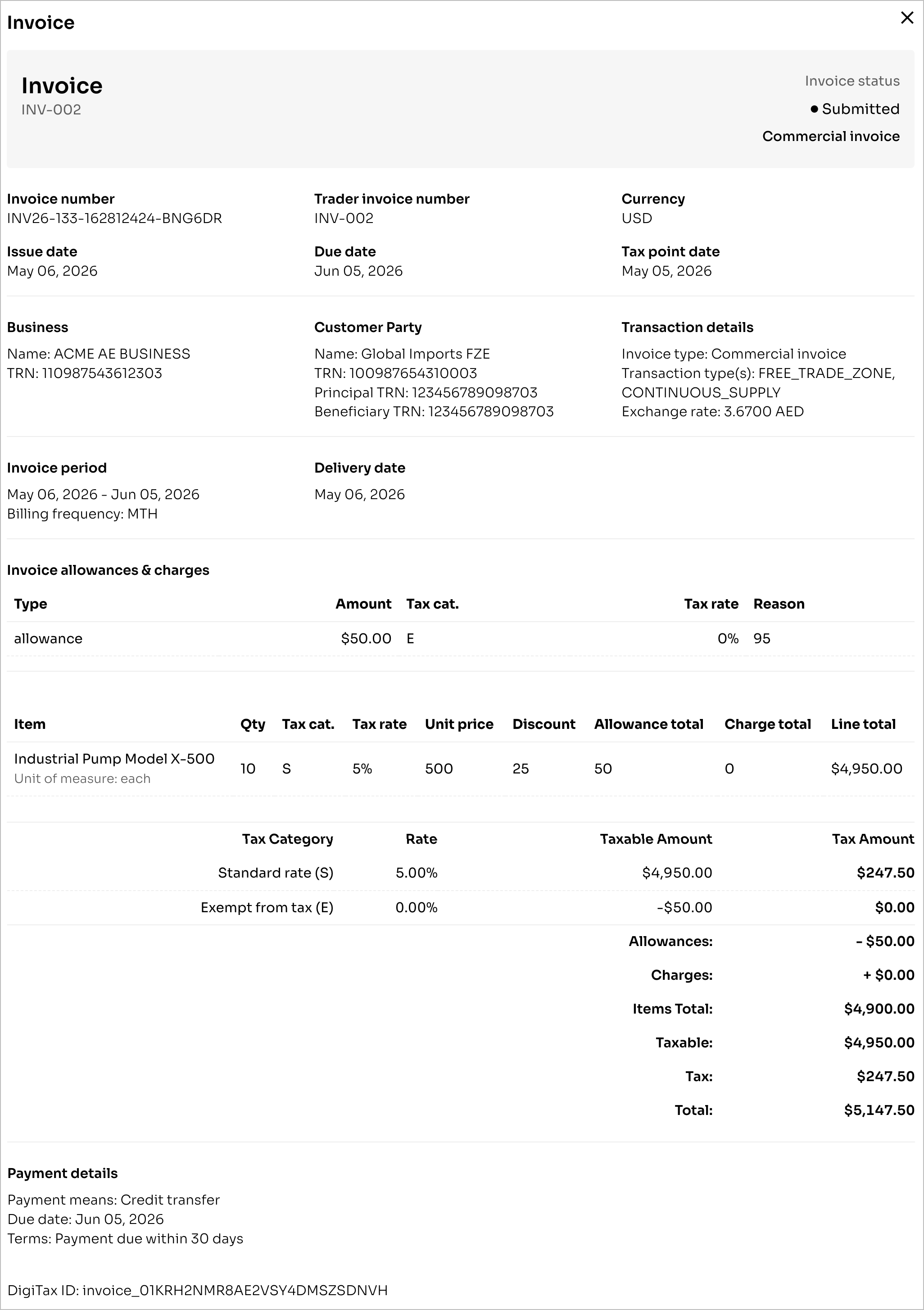
FTA e-invoice on DigiTax Dashboard
FTA e-invoice via the DigiTax API
{
  "id": "invoice_01KRH2NMR8AE2VSY4DMSZSDNVH",
  "created_at": "2026-05-13T16:28:12Z",
  "updated_at": "2026-05-13T16:28:17Z",
  "active": true,
  "invoice_number": "INV26-133-162812424-BNG6DR",
  "uuid": "12fd92b4-05d0-40e5-a573-e4aa7d642db3",
  "trader_invoice_number": "INV-002",
  "transaction_type_code": "10001000",
  "transaction_types": [
    "FREE_TRADE_ZONE",
    "CONTINUOUS_SUPPLY"
  ],
  "invoice_type_code": "380",
  "issue_date": "2026-05-06",
  "issue_time": "10:00:00",
  "due_date": "2026-06-05",
  "tax_point_date": "2026-05-05",
  "document_currency_code": "USD",
  "tax_currency_code": "AED",
  "tax_currency_exchange_rate": 3.67,
  "buyer_reference": "BR-2026-00789",
  "accounting_cost": "CAPEX-2024-Q4",
  "project_reference": "PROJ-JEBEL-2024",
  "note": "General invoice details",
  "invoice_period": {
    "start_date": "2026-05-06",
    "end_date": "2026-06-05",
    "billing_frequency_code": "MTH"
  },
  "customer_party_id": "party_01KRGD0QZG5TXDYXTRHF3C4FNH",
  "delivery": {
    "actual_delivery_date": "2026-05-06",
    "delivery_location_id": "LOC-JEBEL-ALI-001",
    "delivery_location_scheme_id": "0088",
    "delivery_address": {
      "street_name": "Sheikh Zayed Road, Tower 1",
      "additional_street_name": "Floor 22",
      "city_name": "Dubai",
      "postal_zone": "00000",
      "country_subentity": "DXB",
      "country_code": "AE",
      "address_line": "Near Dubai Mall"
    },
    "delivery_party_name": "Global Imports FZE - Warehouse",
    "delivery_terms_id": "DAP"
  },
  "line_extension_amount": 4950,
  "tax_exclusive_amount": 4900,
  "tax_inclusive_amount": 5147.5,
  "payable_amount": 5147.5,
  "allowance_total_amount": 50,
  "charge_total_amount": 0,
  "prepaid_amount": 0,
  "payable_rounding_amount": 0,
  "tax_amount": 247.5,
  "tax_included_indicator": false,
  "tax_amount_in_tax_currency": 908.33,
  "status": "SUBMITTED",
  "payments": [
    {
      "id": "payment_01KRH2NMR8AE2VSY4DN49BDJYV",
      "payment_means_code": "30",
      "payment_means_code_name": "Credit transfer",
      "payment_id": "PAY-REF-2024-001",
      "payee_account_id": "AE070331234567890123456",
      "payee_account_name": "Acme Trading LLC - Main Account",
      "payee_financial_institution_bic": "ADCBAEAA",
      "payment_terms_note": "Payment due within 30 days",
      "payment_terms_due_date": "2026-06-05"
    }
  ],
  "items": [
    {
      "id": "invoiceitem_01KRH2NMR8AE2VSY4DMXM0ZGQZ",
      "created_at": "2026-05-13T16:28:12Z",
      "updated_at": "2026-05-13T16:28:12Z",
      "active": true,
      "item_id": "item_01KRGD1Z8XZNECPQE1KE00CJDE",
      "line_id": 1,
      "quantity": 10,
      "unit_of_measure_code": "EA",
      "line_extension_amount": 4950,
      "tax_amount": 247.5,
      "price_amount": 500,
      "price_discount": 25,
      "gross_price": 525,
      "tax_category_code": "S",
      "tax_rate": 0.05
    }
  ],
  "taxes": [
    {
      "id": "taxbreakdown_01KRH2NMR8AE2VSY4DN1GQEQWR",
      "tax_category_code": "S",
      "taxable_amount": 4950,
      "tax_amount": 247.5,
      "currency": "USD",
      "tax_rate": 0.05
    }
  ],
  "beneficiary_trn": "123456789098703",
  "reported_at": "2026-05-13T16:28:17Z",
  "submitted_at": "2026-05-13T16:28:16Z",
  "validated_at": "2026-05-13T16:28:14Z"
}
Margin Scheme Invoices (Tax Category N)
N)Use tax category N - Standard rate additional VAT when selling eligible second-hand goods, antiques, or collectors' items under the UAE FTA Profit Margin Scheme.
Under this scheme, VAT is due on your profit margin, not the total selling price. The margin is treated as VAT-inclusive, so the VAT you owe to the FTA is:
$$\text{VAT Owed} = (\text{Selling Price} - \text{Purchase Price}) \times \frac5105$$
By UAE tax law (Article 29(7) of the VAT Executive Regulation), the tax invoice must not disclose the margin VAT amount or your purchase price. You account for the margin VAT directly in your periodic VAT return. As a result, the e-invoice presents 0 VAT.
What to Send in the Request
transaction_types: Must include"PROFIT_MARGIN_SCHEME".- Line Items: Every item must have
tax_category_code: "N",tax_rate: 0.05, andprice_amountequal to the full selling price. - Category Consistency: All line items on the invoice must use category
N(mixing with other tax categories likeS,E, orZis not permitted). - Allowances & Charges: Document-level allowances and charges are not allowed on margin scheme invoices.
- Restrictions: Margin scheme is not allowed with invoice type
480(out of scope) or withEXPORTS.
What You Get in the Response
tax_amount: 0on every line item.- Exactly one tax breakdown for category
Nwithtaxable_amountequal to the full selling price sum andtax_amount: 0. - Totals contain no VAT -
tax_inclusive_amountequalstax_exclusive_amount.
Example
Suppose you bought a eligible used car for AED 100,000 and sell it for AED 200,000:
- The e-invoice records the sale at AED 200,000 with 0 VAT.
- In your VAT return, you calculate and pay:
$$(200,000 - 100,000) \times \frac5105 = \text{AED} 4,761.90$$ - Your original purchase price (AED 100,000) never appears anywhere in the e-invoice.
Reference: See the FTA's Profit Margin Scheme Guide (VATGPM1) and Cabinet Decision No. 52 of 2017.
Transaction Type Requirements & Enforced Rules
Depending on your selected transaction_types, the following fields are conditionally required:
| Transaction Type | Required Fields / Rules |
|---|---|
FREE_TRADE_ZONE | Requires beneficiary_trn. |
AGENT_BILLING | Requires principle_trn (must differ from the issuing business TRN). |
SUMMARY_INVOICE | Requires invoice_period (with start_date and end_date) and billing_frequency_code. |
CONTINUOUS_SUPPLY | Requires invoice_period.start_date and invoice_period.end_date. |
EXPORTS | Requires delivery.delivery_terms_id and a non-AE delivery address country code. |
PROFIT_MARGIN_SCHEME | All items must be category N (0.05), no doc-level charges/allowances, forbidden with EXPORTS. |
Payment & Delivery Validation Rules
- Payments: At least one payment entry is required on standard invoices.
- Credit Transfer (
payment_means_code: "30"): Requirespayee_account_id(IBAN / bank account). - Payment Due Dates: If
payment_terms_due_dateis provided,payment_terms_noteis required. - Delivery: If the
deliveryobject is provided,actual_delivery_dateis required. Ifdelivery_location_idis supplied,delivery_location_scheme_idis required.
Updated about 1 month ago