
Create a party
A party is a prerequisite of an invoice
An FTA e-invoice
To recap, even though an FTA e-invoice has several variations of invoice fields, it mainly contains:
- a single customer party
- item (at least one)
In this guide, we'll walk through creating a party.
Creating a party for an FTA e-invoice
A party represents a business entity you transact with, such as a customer (buyer). You must create a party before you can issue an invoice to them.
In the context of an e-invoice, there are two primary roles:
- Buyer (Customer): The recipient of the goods or services.
- Seller (Supplier): The issuer providing the goods or services.
When issuing regular tax invoices, you are the seller (configured under your DigiTax business), and your customer is the buyer created as a party. See the buyer vs seller section below for details on self-billing.
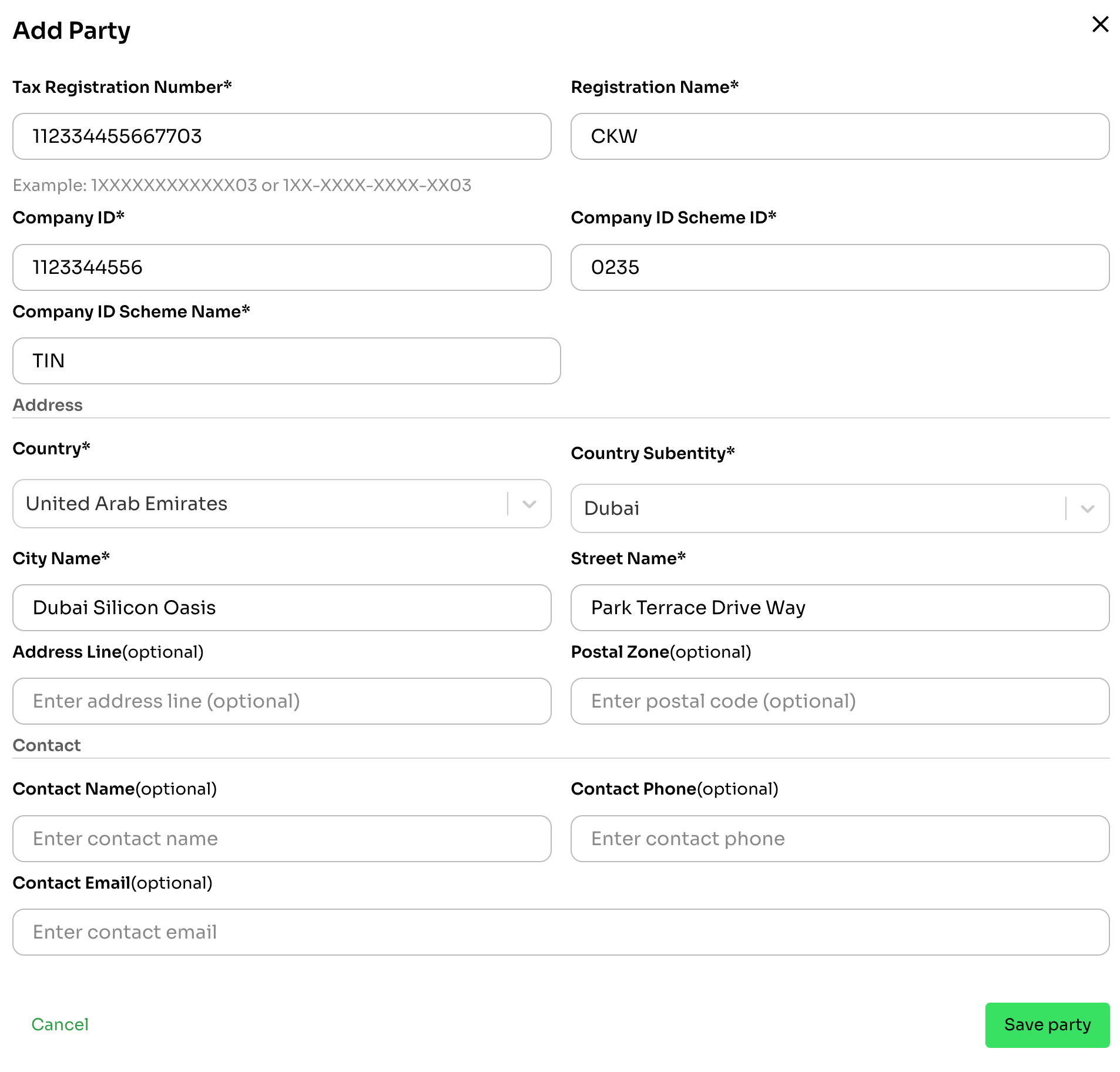
To create an FTA e-invoice party, you need the following details:
Review party attributes here
- Tax Identification Number (
tax_identification_number): Required for every party. For UAE parties, this is the 10-digit TIN — the first 10 digits of the 15-digit TRN. - Legal Entity (
legal_entity): Required object containing registration details:- Registration Name (
registration_name): Legal entity name - Registration Number (
registration_number): Registration/identifier number (e.g. Trade License number, Emirates ID). Required for UAE-addressed parties. - Registration Scheme (
registration_scheme): ISO 6523 ICD code (e.g.0235for UAE FTA scheme). Required for UAE-addressed parties. - Issuing Authority Code (
issuing_authority_code): Legal registration type (TL,CL,EID,PAS,CD). Required for UAE-addressed parties. - Issuing Authority Name (
issuing_authority_name): Issuing authority name (e.g. "Department of Economic Development" forTL, or 2-letter ISO country code forPAS).
- Registration Name (
- Tax Registration Number (
tax_registration_number): 15-digit UAE TRN. Only applicable to UAE VAT-registered parties — optional. - Address (
address):- Country Code (
country_code, e.g.AE) - Country Subentity (
country_subentity, e.g.DXB) - City Name (
city_name) - Street Name (
street_name) - Address Line (optional)
- Postal Zone (optional)
- Country Code (
- Contact (optional):
- Contact Name (
contact_name) - Contact Phone (
contact_phone) - Contact Email (
contact_email)
- Contact Name (
- Peppol Identification (optional):
- Peppol ID (
peppol_id) - Peppol Scheme (
peppol_id_scheme, e.g.0235)
- Peppol ID (
The screenshot below from the dashboard succinctly shows the details required when creating a party.
On the API, once the required fields are submitted in POST /parties, the response will read:
{
  "id": "party_01KPWG0PS82JBV20JD0PC93XBR",
  "created_at": "2026-04-23T06:21:41Z",
  "updated_at": "2026-04-23T06:21:41Z",
  "active": true,
  "tax_identification_number": "1222333444",
  "tax_registration_number": "122233344455503",
  "legal_entity": {
    "registration_name": "CKW Trading LLC",
    "registration_number": "CN-1123344556",
    "registration_scheme": "0235",
    "issuing_authority_code": "TL",
    "issuing_authority_name": "Department of Economic Development"
  },
  "address": {
    "street_name": "Park Terrace Drive Way",
    "city_name": "Dubai Silicon Oasis",
    "country_subentity": "DXB",
    "country_code": "AE"
  }
}
Party details
Tax Identification Number and Registration Name
The tax_identification_number is the 10-digit TIN assigned by the Federal Tax Authority (FTA) — required for every party. For UAE parties, the TIN is the first 10 digits of the 15-digit TRN. The tax_registration_number (the full 15-digit TRN) is optional and only applicable to UAE VAT-registered parties. The legal_entity.registration_name must match the official registered legal name of the entity.
Company and Scheme Details
When creating a party in the UAE PINT-AE framework, the identifier scheme defines the authority and type of registration.
-
Electronic Address / Endpoint ID (Peppol Network)
The standard Peppol participant scheme for the UAE:
- Scheme ID:
0235 - Value: The party's 10-digit TIN (the first 10 digits of the 15-digit TRN).
- Scheme ID:
-
Legal Registration Types (
legal_entity.issuing_authority_code)Code Registration Type When to use it TLCommercial/Trade License Default. For standard UAE VAT-registered commercial businesses. Requires company_id_scheme_agency_name.CLCommercial License For entities with specialized commercial licenses. EIDEmirates ID For individual UAE residents or sole proprietorships. PASPassport For natural persons without a UAE trade license ( agency_namemust be 2-letter ISO country code).CDCabinet Decision For Government ministries, public authorities, or special exempted statutory bodies.
In our example, we used:
| Field | Value |
|---|---|
| Tax Identification Number | 1222333444 |
| Tax Registration Number | 122233344455503 |
legal_entity.registration_name | CKW Trading LLC |
legal_entity.registration_number | CN-1123344556 |
legal_entity.registration_scheme | 0235 |
legal_entity.issuing_authority_code | TL |
legal_entity.issuing_authority_name | Department of Economic Development |
Address
The address requires country_code (e.g. AE), country_subentity (e.g. DXB), city_name, and street_name. postal_zone and address_line are optional.
Contact
Optional contact person fields: contact_name, contact_phone, and contact_email.
Buyer vs Seller
In standard e-invoicing:
- Seller: Your business issuing the invoice.
- Buyer: Your customer receiving the invoice, created via
POST /parties.
Note on Party Creation and Self-BillingRows in the
partiescollection are created explicitly when you callPOST /parties, or automatically during self-billed document creation (POST /self-billed-invoices/POST /self-billed-credit-notes), where your own business is registered as the self-billing customer party.Creating a business on DigiTax does not automatically populate
GET /partiesuntil parties are added or self-billing documents are processed.
When fetching all parties via GET /parties, the response includes all active registered customer parties:
{
  "data": [
    {
      "id": "party_01KPWG0PS82JBV20JD0PC93XBR",
      "created_at": "2026-04-23T06:21:41Z",
      "updated_at": "2026-04-23T06:21:41Z",
      "active": true,
      "tax_identification_number": "1222333444",
      "tax_registration_number": "122233344455503",
      "legal_entity": {
        "registration_name": "CKW Trading LLC",
        "registration_number": "CN-1123344556",
        "registration_scheme": "0235",
        "issuing_authority_code": "TL",
        "issuing_authority_name": "Department of Economic Development"
      },
      "address": {
        "street_name": "Park Terrace Drive Way",
        "city_name": "Dubai Silicon Oasis",
        "country_subentity": "DXB",
        "country_code": "AE"
      }
    }
  ],
  "cursor": {
    "page_size": 20
  }
}
Updated 2 days ago